Sony Venice / Venice 2
Control Modes
bitbox supports Venice 1 and Venice 2 control via IP.
This can be used with bit.ctrl, Web GUI or an RCP.
Connection (RJ45 Ethernet)
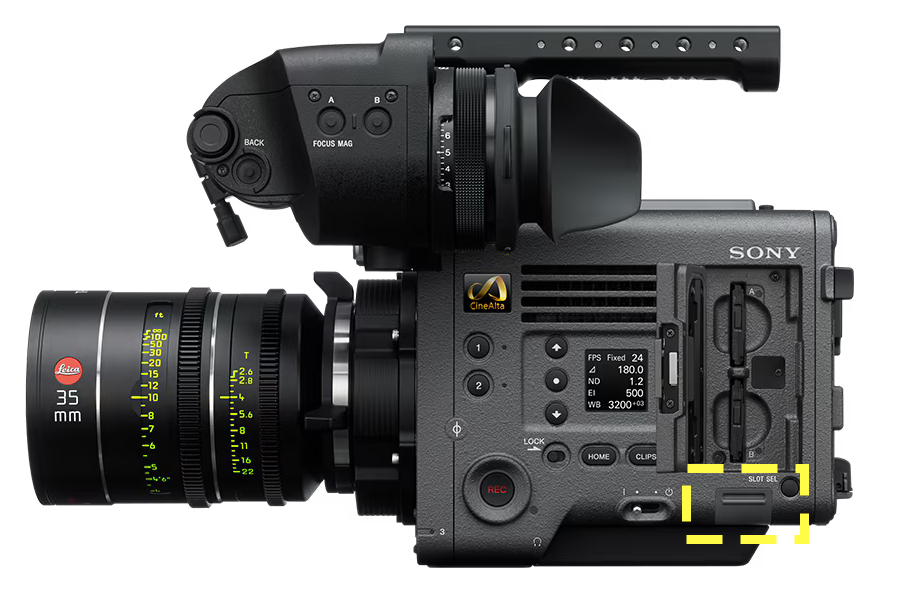
Venice 1
The Venice 1 Ethernet port is behind a door located on the operator side of the camera, directly under the SxS slots.
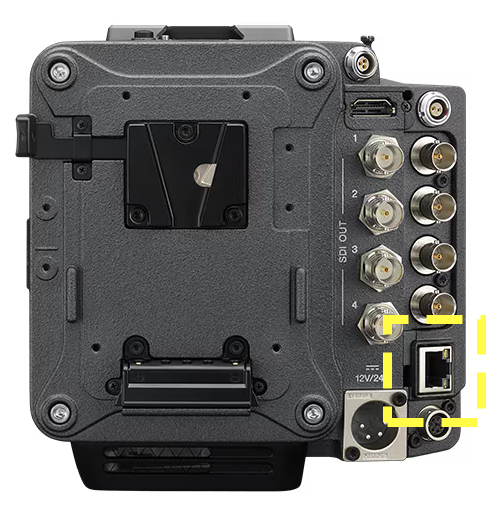
Venice 2
The Venice 2 Ethernet port is located on the back of the camera.
IP Address Configuration
Menu (Long Press)→Technical→Network- Change
SettingtoLAN, return to Network settings. - Under
Network→LAN- Set
DHCPtoOff - Configure
IPandNetmask
- Set
- Click
Setto confirm
For more information about IP addressing, please see IP Addressing.
bit.ctrl Setup
For control with bit.ctrl, see bit.ctrl → Sony Venice.
Additional Step for RCP IP Control
bitbox and IP RCP are an exceptionally reliable pairing. The above network configuration remains the same, but additionally you will need to:
Menu (Long Press)→Technical→System Configuration- Set
RM/RCP Paint ControltoOn
Authentication Configuration
Venice and Venice 2 require authentication for Web UI control.
Menu (Long Press)→Technical→Authentication- Set
User NameandPassword
Sony offers a complete reset of the network settings, we recommend this step for unfamiliar Venice cameras. This will reset all network parameters as well as authentication information.
Menu (Long Press)→Maintenance→Network Reset- Select and confirm
Reset
Troubleshooting / Common Issues
Venice Ethernet not connecting to bitbox
You likely have an old firmware revision on your bitbox. There is a firmware fix available. Please email [email protected].
Browser Tiling - multiple WebUIs open on one window
With the Vivaldi Browser you can tile multiple tabs into one window for a single pane control of multiple cameras. Please see this article.
Connector Pinout
The Sony Venice and Venice 2 use the ANSI T568B standard with an 8P8C Ethernet "RJ45" connector, there is no special cable required for bitbox.
View: Looking at connector with clip facing down
| Pin | 1 | 2 | 3 | 4 | 5 | 6 | 7 | 8 |
| Color | ||||||||
| Function | TX+ | TX- | RX+ | — | — | RX- | — | — |